August 27, 2026
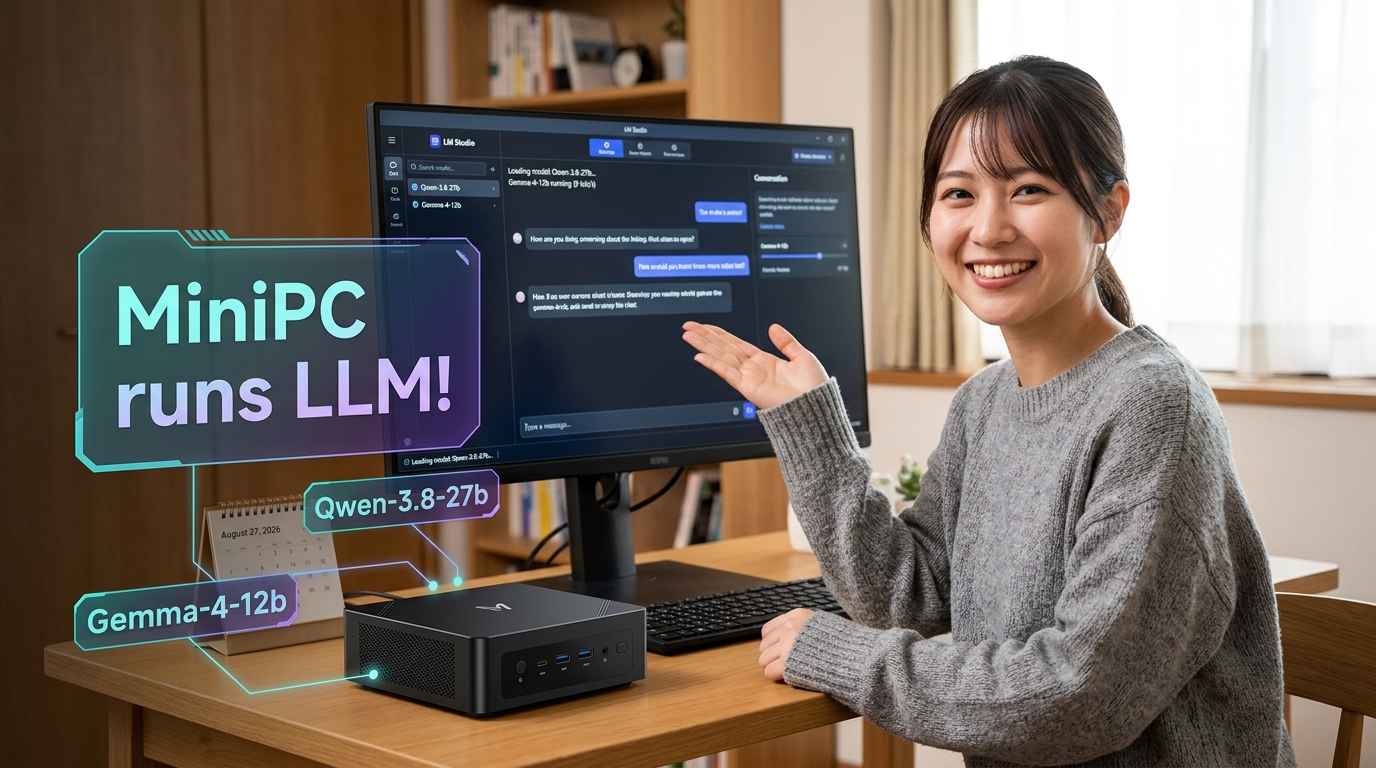
I struggled for two hours to get the two trending AIs: Qwen-3.8-27b & Gemma-4-12b on my local PC: Minisforum UM790 Pro/64GB. Qwen-3.8-27b runs at 6 tok/s, and Gemma-4-12b at 9 tok/s both at 262k ‘nameplate’ context window. Slow, but can be used practically for certain purposes. Here’s the complete record of my struggle – a ChatGPT chatlog that tells you everything that may be of some help if you want to run a local LLM on a pc with Radeon 780M.
***
Me: I wanted to use my Minisforum UM790 Pro for running Qwen3.8-27b on LM Studio but failed. It’s probably due to GPU ram size. The bios gives option of “GPX Configuration” to change “UMA Frame Buffer Size” but “UMA Specified” menu shows up to 16GB. Guide me please, how can the UMA Frame Buffer Size be changed to 32GB?
ChatGPT: Yes — your diagnosis is probably directionally correct, but there is an important limitation:
Short answer: you probably cannot set 32 GB on the UM790 Pro BIOS
On the UM790 Pro, the available UMA Frame Buffer Size is determined by the BIOS firmware. The current BIOS versions publicly provided by Minisforum include 1.07 and 1.09, and reports for BIOS 1.09 indicate that 16 GB is the maximum selectable UMA_SPECIFIED value.
So if your menu shows:
- Auto
- 2 GB
- 4 GB
- 8 GB
- 16 GB
and does not show 32 GB, there is no normal BIOS setting that will unlock 32 GB.
First, check your RAM configuration
The UM790 Pro officially supports up to 64 GB of DDR5-5600 RAM and uses the Radeon 780M integrated GPU.
If you have:
- 32 GB total RAM → setting UMA to 16 GB leaves only about 16 GB for Windows and everything else. This is generally a bad configuration for a 27B model.
- 64 GB total RAM → 16 GB dedicated UMA + roughly 48 GB remaining system RAM is much more sensible.
Could you tell me exactly how much RAM is installed in your UM790 Pro—32 GB or 64 GB?
Why 32 GB UMA is probably not necessary for LM Studio
This is the crucial point.
UMA Frame Buffer Size ≠ the total amount of memory LM Studio can necessarily use for the iGPU.
The 16 GB setting is primarily a pre-allocated/reserved VRAM aperture. The Radeon 780M is a unified-memory GPU, so additional system RAM can potentially be dynamically shared, depending on:
- Windows
- AMD driver
- Vulkan implementation
- LM Studio’s GPU backend
- the particular GGUF model and quantization
Older UM790 Pro/Linux investigations, for example, found that GPU-addressable memory could be substantially larger than the fixed BIOS allocation, although application support was important.
Therefore, simply forcing “32 GB VRAM” would not necessarily make Qwen3.8-27B run.
What I recommend you do
Step 1 — Set BIOS to 16 GB
Use:
BIOS → Advanced → AMD CBS → NBIO Common Options → GFX Configuration
Then:
- iGPU Configuration: UMA_SPECIFIED
- UMA Frame Buffer Size: 16 GB
This is the documented/reported path for the UM790 Pro.
Save and reboot.
Step 2 — Verify Windows sees the GPU memory correctly
In Windows:
Task Manager → Performance → GPU
Please check and tell me:
- Dedicated GPU memory
- Shared GPU memory
- Total RAM
A screenshot would be ideal.
Step 3 — Do not use the largest Qwen3.8-27B quantization initially
For a 27B model, the quantization is absolutely critical.
Please tell me the exact LM Studio model filename, for example something like:
Qwen3.8-27B-Q4_K_M.gguf
Qwen3.8-27B-Q5_K_M.gguf
Qwen3.8-27B-Q8_0.gguf
The file size matters enormously. A model that barely fits into 16 GB may still require considerably more memory once LM Studio adds:
- KV cache
- context window
- runtime buffers
- Vulkan allocations
This may be the real reason it fails.
My likely best configuration for your UM790 Pro
Assuming you have 64 GB RAM, I would try:
Setting
Recommendation
BIOS UMA
16 GB
RAM
64 GB dual-channel DDR5-5600
GPU backend
Vulkan
GPU offload
Maximum possible
Context length
Start at 4K or 8K
Model
Q4-class GGUF
Flash attention
Test both on/off
The UM790 Pro’s Radeon 780M has excellent memory bandwidth for an iGPU, but a 27B model is pushing it quite hard. Expect the limitation to be memory bandwidth and shared-memory architecture, not merely the nominal VRAM number.
My suggestion
Before attempting any BIOS modification or unofficial BIOS hack, please send me:
- Your total RAM (32 or 64 GB)
- Your exact BIOS version
- The exact Qwen3.8-27B GGUF filename and file size
- The LM Studio error message or screenshot
With those four pieces of information, I can tell you very specifically whether your model should run on the UM790 Pro and what LM Studio settings—including GPU offload layers, context size, and quantization—you should use.
I do not recommend trying to modify the BIOS to force 32 GB at this stage. The evidence suggests the UM790 Pro’s official BIOS exposes 16 GB as its practical maximum, and an unofficial BIOS modification carries a real risk of leaving the mini-PC unable to boot.
Me: The total RAM size is 64GB. Windows Task Manager>GPU shows Dedicated GPU memory 15.9GB and Common GPU memory 31.8GB. LM Studio had qwen/qwen3.8-27b but failed, so replaced with qwen3.8-27b-heretic-abliterated-uncensored. Press Load Model, and in 30 seconds it shows “Failed to load model. Engine protocol runtime llama-server for BNuDGMtEVNFzzg0k6z191/xY exited before becoming healthy. exitCode=3221226505, signal=null “
That information changes the diagnosis substantially. Your hardware configuration is actually better than I initially thought:
- RAM: 64 GB
- Dedicated/reserved GPU memory: 15.9 GB
- Shared GPU memory: 31.8 GB
- Total GPU-addressable memory shown by Windows: approximately 47.7 GB
So you do not need to force the BIOS UMA setting to 32 GB. Windows is already allowing the Radeon 780M to access up to 31.8 GB of shared system memory.
However, there is an important distinction:
Windows reporting 31.8 GB shared GPU memory does not mean LM Studio/llama.cpp can treat it like a 32 GB dedicated VRAM pool.
The error code is the important clue
Your error:
exitCode=3221226505In hexadecimal, that is:
0xC0000409That is not the normal “out of memory” error code. It usually indicates that the native process terminated because of a runtime failure/security check/stack corruption-type exception.
Therefore, my current suspicion is:
- Not simply “UMA is only 16 GB.”
- More likely a llama.cpp runtime crash, possibly related to Vulkan/AMD, the particular model architecture, or LM Studio’s current engine.
- The fact that it crashes after approximately 30 seconds while loading is useful: the engine starts, attempts initialization/loading, and then dies.
Also, Qwen3.8-27B is extremely new, having been released only recently, so runtime compatibility is still evolving.
My first recommendation: use the official Qwen3.8 model, not the Heretic variant
For troubleshooting, please temporarily stop using:
qwen3.8-27b-heretic-abliterated-uncensoredAn abliterated derivative may have:
- modified metadata
- unusual tokenizer/chat-template assumptions
- a different quantization
- incomplete compatibility with a newly released architecture
We should first make the official LM Studio catalog model work.
LM Studio currently lists Qwen3.8-27B at approximately 16.10 GB, but the actual memory required during loading/inference is greater because runtime buffers and context are also required.
Important: what exact quantization did LM Studio download?
This is now my most important question.
Please look at the model details and tell me something like:
Q4_K_Mor:
Q5_K_M
Q6_K
Q8_0
IQ4_XS
This matters enormously.
For example, recent measurements report approximately:
- Q4_K_M: about 17.1 GB
- IQ4_XS: about 15.7 GB
- UD-Q3_K_XL: about 13.4 GB
A 16 GB reserved UMA configuration is therefore right on the boundary even before runtime overhead.
I recommend this exact test sequence
Test 1 — Set a small context window
When loading the official Qwen3.8-27B, look at the model load settings.
Set:
Context Length: 4096Do not initially use:
32768
65536
131072
262144
Qwen3.8 has a native context capability of up to 262K tokens, but that does not mean your machine should allocate anywhere near that amount. Large context windows can require enormous additional memory.
For the first test:
4096 tokens
is sufficient.
Test 2 — Disable mmap
This is particularly interesting because AMD’s recent guidance for running Qwen3.8-27B with LM Studio specifically says:
Uncheck “Try mmap” in advanced model load settings.
That is directly relevant to your failure. AMD also says the model needs roughly 24 GB of variable graphics memory/VRAM to run comfortably, while noting that it can run on older supported AMD platforms.
So:
In Advanced Model Load Settings
Turn:
Try mmapOFF
Then try loading again.
This would be my first actual change.
Test 3 — Use partial GPU offloading
Do not immediately force everything onto the Radeon 780M.
Try these configurations in sequence:
A. CPU only
GPU Offload: 0
Context: 4096
Try mmap: OFF
This test is extremely important.
If it loads successfully on CPU, then:
The model itself is valid, and the crash is probably GPU/Vulkan-related.
It will be slow, but we’re only testing whether the engine can load.
B. Moderate GPU offload
If CPU-only loads:
GPU Offload: approximately 25–50%
Context: 4096
Try mmap: OFF
Try loading.
C. Maximum GPU offload
Only after A and B work:
GPU Offload: Maximum
Context: 4096
Try mmap: OFF
This will tell us exactly where the Radeon/Vulkan memory problem begins.
Test 4 — Check LM Studio version
You should tell me your exact version:
LM Studio 0.x.xxThe current Windows download is LM Studio 0.4.20.
There has also been a recently reported LM Studio 0.4.20 Windows issue where GGUF models fail because llama-server cannot handle certain non-ASCII characters in the Windows TEMP path. That particular reported case usually produces exitCode=1, not your 3221226505, so I do not think it is the primary explanation—but it is worth checking if your Windows username/path contains Japanese characters.
One more important point about your 780M
Your Radeon 780M has:
Dedicated UMA: 15.9 GB
Shared memory available: 31.8 GB
That is already the maximum practical configuration for your system in Windows.
Trying to reserve 32 GB in BIOS would actually be potentially counterproductive:
64 GB total
− 32 GB permanently reserved
= only ~32 GB left for Windows + LM Studio
The current configuration is probably preferable:
~16 GB guaranteed GPU allocation
+ up to ~32 GB dynamically shared
+ remaining memory for CPU/runtime
Do not change the BIOS further yet.
My strongest suspicion right now
I would rank the possibilities:
Probability
Cause
High
Qwen3.8 runtime/model compatibility issue with current LM Studio/llama-server
High
Vulkan/Radeon 780M crash during GPU initialization or model offload
Medium-high
Model quantization exceeds the 16 GB fixed UMA boundary
Medium
Context/KV-cache allocation too large
Medium
Try mmap issue
Low
Simply needing 32 GB BIOS UMA
The AMD guidance specifically recommending “Try mmap” OFF makes that setting especially worth testing.
Please send me these next
A screenshot of the LM Studio model loading settings screen, or just tell me:
- LM Studio version
- Exact GGUF filename / quantization
- Context length
- GPU Offload setting
- Whether Try mmap is currently ON
- Your AMD Adrenalin driver version
With that information, I can give you a very specific configuration for the UM790 Pro rather than guessing.
Me: Thank you. Now it’s running when set to 4096 tokens. Painfully slow at 4 tok/s. It’s just for an experiment.
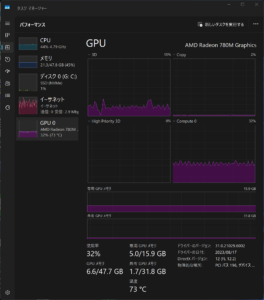
Excellent — that confirms the diagnosis. The 32 GB UMA setting was not the problem. The model failed because the original configuration was trying to allocate too much memory, most likely for the KV cache/context.
Your screenshot is very informative:
- RAM: 21.3 / 47.8 GB
- Dedicated GPU memory: 5.0 / 15.9 GB
- Shared GPU memory: 1.7 / 31.8 GB
- Total GPU memory in use: 6.6 / 47.7 GB
- GPU utilization: 32%
- Temperature: 73°C
So the system is running normally, and your experiment has demonstrated that the UM790 Pro can run Qwen3.8-27B locally.
4 tok/s is actually a reasonable result
For a 27B model on a Radeon 780M iGPU with DDR5 shared memory, 4 tokens/sec is not surprising. The fundamental bottleneck is memory bandwidth:
27B model
        ↓
shared DDR5 system memory
        ↓
Ryzen 9 7940HS / Radeon 780M
        ↓
~4 tok/s
Unlike a discrete GPU with GDDR6/GDDR7, the 780M is limited by system DDR5 bandwidth. Increasing UMA from 16 GB to 32 GB would not materially increase token generation speed.
One thing I noticed: your AMD driver is quite old
The screenshot shows:
Driver version: 31.0.21029.6002
Driver date: 2023/08/17
That is quite old for experimenting with modern Vulkan/llama.cpp/LM Studio workloads. I would not change anything immediately since it is now working, but updating the AMD graphics driver could be an interesting future experiment. Newer Vulkan drivers sometimes substantially improve stability or performance.
For your current experiment, though, I would regard this as a success:
64 GB UM790 Pro + 16 GB UMA + 4096 context = Qwen3.8-27B successfully running at about 4 tok/s.
And the most important practical lesson is probably:
The 4096-token setting mattered far more than UMA
With 64 GB RAM, you have enough total memory, but a large context window can create a very large KV cache. Reducing it to 4096 allowed the llama-server engine to initialize successfully.
If you want to continue experimenting later, I would test:
Experiment
Expected result
4096 → 8192 context
Probably still works
8192 → 16384
May hit a memory/runtime limit
Newer AMD driver
Possibly better Vulkan stability/performance
Smaller 14B model
Much faster
Q4 vs Q3 quantization
Q3 may load faster/lower memory
GPU offload variations
Useful for finding the 780M optimum
But for a one-off experiment, you have already answered the interesting question: yes, your UM790 Pro can run a 27B Qwen model locally.
Me: With AMD driver updated to Adrenalin 26.8.1, google/gemma-4-12b-qat with 262k tokens ran at 9 tok/s and was practically usable. I will not go deeper into experimenting with quen-3.8-27b, which runs at the same 3 tok/s with the new AMD driver.
That sounds like a very sensible stopping point. Your experiments have produced a clear practical conclusion:
Model
Context
Speed
Practical assessment
Gemma 4 12B QAT
262K
9 tok/s
Practically usable
Qwen 3.8 27B
4K
~3 tok/s
Experimental / too slow
The most interesting result is actually Gemma 4 12B QAT at 262K context. That demonstrates that the UM790 Pro’s 64 GB RAM + Radeon 780M shared-memory architecture can be surprisingly useful for local LLMs—provided the model size is appropriate.
Your Adrenalin 26.8.1 update also appears to have solved any concern that the old 2023 driver was a fundamental compatibility problem. Since Qwen still remains around 3 tok/s, the bottleneck is clearly the computational/memory-bandwidth cost of a 27B model rather than a simple driver issue.
For practical use, I would regard your current sweet spot as roughly:
7B–14B class models, especially efficient QAT/quantized models, on the UM790 Pro.
At 9 tok/s, interactive use becomes reasonably comfortable. At 3 tok/s, it becomes more like waiting for a slow typist.
One caveat: a 262K maximum context setting does not necessarily mean you can comfortably fill 262K tokens without performance and memory consequences; but the fact that Gemma loaded and ran at that setting is nevertheless impressive for this machine.
So yes—I’d stop experimenting with Qwen3.8-27B too. You have already established the important result: the UM790 Pro can technically run it, but the 12B-class model is the much better practical fit.
Me: I don’t know why it happaned but qwen/qwen3.8-27b Context:262144 GGUF MTP (default setup) now runs on UM790Pro at 6 tok/s. It’s slow but gives more sophisticated answers than Gemma 4 12B. It could be used to run slow tasks, maybe.
That is actually a very interesting—and useful—result. I think your conclusion is right.
Your UM790 Pro now has two practical local-LLM modes
Use
Model
Context
Speed
Interactive work
Gemma 4 12B QAT
up to 262K
~9 tok/s
Higher-quality slow work
Qwen3.8-27B
262K
~6 tok/s
6 tok/s is significantly better than the earlier 3–4 tok/s, especially for a 27B model on a Radeon 780M iGPU.
Why might it suddenly work at 262K?
Several things may have changed together:
- AMD Adrenalin 26.8.1 likely improved Vulkan compatibility/performance.
- LM Studio may be using a different or updated llama-server runtime/engine.
- The original failure may have been a transient allocation or initialization failure rather than a genuine memory-capacity limit.
- MTP (Multi-Token Prediction) can improve effective generation throughput under some workloads.
- The first successful model load at 4096 tokens may have changed cached/runtime behavior—though I would not rely on that as a reproducible explanation.
One important nuance: setting the context to 262,144 means the engine supports/reserves for that maximum, but it does not necessarily mean 262K tokens are physically occupying the KV cache from the beginning. Modern llama.cpp backends can use different allocation strategies, including mechanisms that avoid committing all theoretically addressable memory immediately. That could explain why the model now starts successfully.
Your proposed use case makes excellent sense
I would divide tasks like this:
Gemma 4 12B — use interactively
- conversation
- quick questions
- brainstorming
- summaries
- routine coding assistance
- translation drafts
- rapid experimentation
Qwen3.8-27B — give it “background jobs”
For example:
- analyze a long document
- compare two chapters of a novel
- perform a consistency check
- generate a detailed critique
- rewrite a long passage
- examine complicated code
- reason through a technical problem
At 6 tok/s, you can simply give it a substantial task and do something else while it thinks and writes.
For your particular work, I think Qwen3.8-27B could be particularly interesting as a slow literary/structural critic. A stronger 27B model does not need to be fast if you ask it to analyze:
chronology, character consistency, duplication, stylistic repetition, and possible AI fingerprints
Those are precisely the kinds of tasks where waiting a few minutes may be worthwhile.
So I would now characterize the UM790 Pro not as a machine that “cannot run 27B,” but rather:
It can run a modern 27B model surprisingly well, provided you accept roughly 6 tok/s as a background-processing speed.
That is a considerably more successful outcome than it first appeared.